
Building an online presence used to require either a hefty budget for a freelance developer or weeks spent wrestling with raw HTML, CSS, and server configurations. Today, modern website creators have completely democratized web development. Whether you are a solo entrepreneur launching a digital storefront, a creative professional assembling an interactive portfolio, or a growing enterprise scaling a content hub, choosing the right platform is the single most consequential digital decision you will make.
With dozens of platforms competing for your attention—each promising drag-and-drop simplicity, generative AI workflows, and enterprise-grade performance—cutting through the marketing noise is harder than ever. This comprehensive guide breaks down everything you need to know about modern website builders, how to evaluate them against your specific goals, and which platforms lead the market in 2026.
What Are Website Creators and How Have They Evolved?
At their core, website creators are all-in-one software platforms that allow individuals and businesses to design, publish, and manage websites without writing code from scratch. Historically, these tools fell into two rigid camps: overly simplistic template editors with severe design limitations, or open-source content management systems (CMS) that demanded technical maintenance, plugin management, and manual security patches.
In 2026, that divide has largely vanished. Modern platforms combine visual, component-based editing with cloud-hosted infrastructure, built-in security (SSL certificates, DDoS protection, automated backups), and native marketing suites. Three major shifts define the current landscape:
- Generative AI Integration: Leading platforms no longer rely solely on static templates. Users can generate custom layouts, draft brand-aligned copy, produce royalty-free imagery, and create tailored CSS animations through conversational prompts.
- Composable Architecture & Visual Development: Even no-code tools now expose granular control over CSS Grid, Flexbox, custom breakpoints, and dynamic CMS collections, allowing designers to build bespoke digital experiences without hiring front-end engineers.
- Native Commerce and Monetization: Selling digital downloads, memberships, subscriptions, and physical inventory is no longer an afterthought. Most platforms include native checkout flows, multi-currency support, and automated tax calculations out of the box.
Table of Contents
Key Factors to Consider Before Choosing a Platform
Before committing to an annual subscription or investing hours into customizing a layout, evaluate potential website creators across six foundational criteria.
1. Ease of Use vs. Design Flexibility
There is always an inherent trade-off between guardrails and freedom. Structured editors (like Squarespace or Wix) use smart grids and pre-styled sections that prevent you from accidentally breaking your mobile layout. Conversely, visual development platforms (like Webflow or Framer) give you pixel-level control over every margin, z-index, and interaction—at the cost of a steeper learning curve. Choose a tool that matches your technical comfort level and the time you are willing to invest.
2. Built-In SEO Capabilities
A visually stunning site is useless if search engines cannot crawl, index, and rank it effectively. When comparing website creators, verify that the platform gives you full control over:
- Custom title tags, meta descriptions, and clean URL slugs.
- Automatic XML sitemap generation and robots.txt editing.
- Fast Core Web Vitals performance (clean code output, automatic WebP/AVIF image compression, and global CDN hosting).
- Schema markup (structured data) support for rich snippets in search results.
- Native 301 redirect managers so you never lose link equity when restructuring pages.
3. E-Commerce and Monetization Features
Even if you are starting with a simple informational site or blog, think twelve months ahead. Does the platform charge additional transaction fees on top of payment processor rates (Stripe, PayPal, Apple Pay)? Can it handle abandoned cart recovery, inventory tracking, digital product delivery, or gated member areas without forcing you into expensive third-party plugins?
4. Scalability and Content Management (CMS)
If your growth strategy relies on content marketing, programmatic SEO, or large product catalogs, look closely at the platform’s CMS architecture. Basic builders work fine for a five-page brochure site, but scaling to 500 blog posts or 2,000 product SKUs requires relational databases, custom fields, dynamic filtering, and bulk import/export tools.
5. App Ecosystems and Third-Party Integrations
No single platform does everything natively. Check how seamlessly your chosen builder connects to your existing tech stack—including email marketing services (Mailchimp, ConvertKit, Klaviyo), CRM platforms (HubSpot, Salesforce), analytics suites (Google Analytics 4, Plausible), and automation tools (Zapier, Make).
6. Total Cost of Ownership
Entry-level plans often advertise low monthly rates that exclude essential features like custom domain connections, ad removal, or basic analytics. Always calculate the real cost of the tier you actually need—factoring in domain renewal fees after year one, required third-party apps, and e-commerce transaction fees.
Top Website Creators Compared: Which One Fits Your Needs?
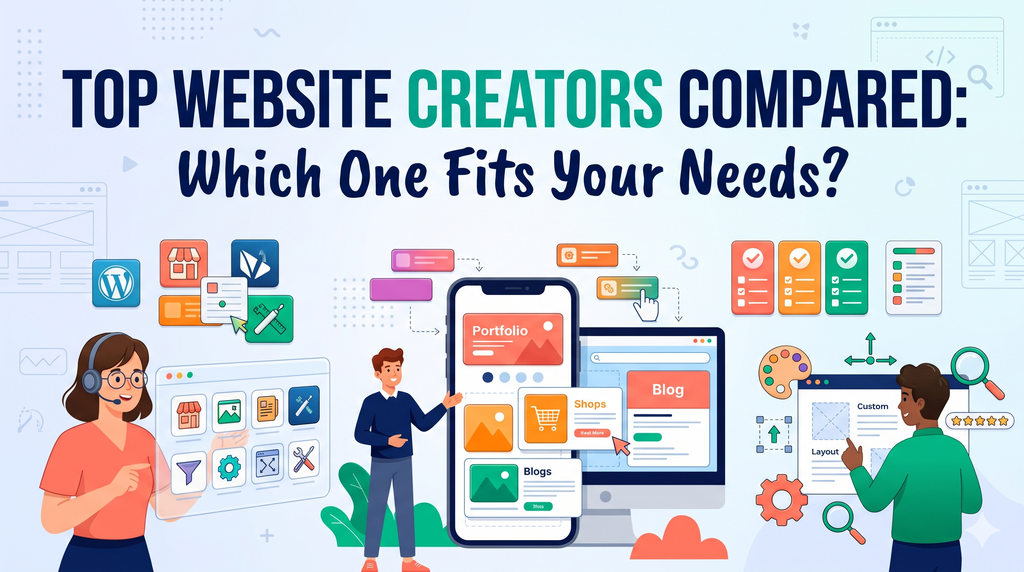
Different projects demand different strengths. Below is an in-depth breakdown of the top website creators dominating the market today, categorized by their ideal use cases.
1. Wix (Wix Studio): Best All-Around Flexibility and AI Tooling
Wix has evolved from a simple drag-and-drop builder into a powerhouse ecosystem. While the standard Wix editor remains accessible for beginners—featuring an AI site generator that builds complete, multi-page drafts from a short conversation—Wix Studio caters to agencies and advanced designers with responsive AI breakpoints, custom CSS access, and reusable design systems.
- Standout Strengths: Unmatched template library (over 900 options), robust native business apps (bookings, restaurants, events, fitness), and strong built-in SEO checklists.
- Potential Drawbacks: Once you choose a template in the classic editor, switching to a completely different template requires rebuilding your pages.
- Best For: Small businesses, service providers, and entrepreneurs wanting an all-in-one platform that grows with them.
2. Squarespace: Best for Design-Driven Brands and Creatives
Squarespace remains the gold standard for aesthetic polish. Its Fluid Engine editor gives users a flexible drag-and-drop grid while maintaining strict typographic harmony and balanced whitespace. In recent updates, Squarespace has heavily expanded its creator economy tools, making it effortless to sell online courses, gated video libraries, and paid newsletters alongside physical goods.
- Standout Strengths: Award-winning minimalist templates, cohesive built-in marketing tools (Email Campaigns, Bio Sites), and seamless invoicing for freelancers.
- Potential Drawbacks: Deeper customization requires writing custom CSS, and third-party app integrations are more limited compared to WordPress or Wix.
- Best For: Photographers, designers, consultants, restaurants, and content creators prioritizing visual storytelling.
3. Shopify: Best for Dedicated E-Commerce Stores
When your primary objective is selling products at scale, Shopify is in a league of its own. While its blogging and informational page editors are simpler than content-first platforms, its commerce engine is unmatched. From multi-channel selling (Instagram, TikTok, Amazon, in-person POS) to the world’s highest-converting one-click checkout (Shop Pay), Shopify handles massive traffic spikes effortlessly.
- Standout Strengths: Vast app store (8,000+ integrations), built-in international selling tools (Shopify Markets), and enterprise-grade inventory and fulfillment management.
- Potential Drawbacks: Monthly costs add up quickly once you factor in paid apps, and using external payment gateways incurs extra fees.
- Best For: Online retailers, dropshippers, direct-to-consumer (DTC) brands, and brick-and-mortar stores expanding online.
4. Webflow: Best for Designers and Custom Marketing Sites
Webflow bridges the gap between visual design software and clean front-end code. Instead of dragging elements randomly onto a canvas, you visually manipulate real HTML elements and CSS properties. Every change you make where Website creatorsgenerates clean, semantic code under the hood, resulting in blazing-fast page speeds and exceptional technical SEO control.
- Standout Strengths: Complete creative freedom without templates, powerful visual CMS for complex content structures, and enterprise-level hosting security.
- Potential Drawbacks: Steep learning curve if you do not understand basic CSS concepts like the box model, flexbox, and classes.
- Best For: Web designers, tech startups, SaaS companies, and marketing teams that want custom, high-converting websites without waiting on engineering sprints.
5. Framer: Best for Interactive Portfolios and High-Velocity Launches
Originally a prototyping tool for UI/UX designers, Framer has transformed into one of the fastest-growing website creators on the market. Its canvas feels instantly familiar to anyone who has used Figma—you can even copy and paste designs directly from Figma into Framer and publish them live in minutes. It excels at smooth physics-based animations, scroll transforms, and rapid landing page deployment done by website creators.
- Standout Strengths: Effortless micro-interactions and animations, instant AI translation/localization, and a frictionless Figma-to-web workflow.
- Potential Drawbacks: E-commerce capabilities rely on third-party embeds (like Lemon Squeezy or Gumroad), and its CMS is lighter than Webflow’s.
- Best For: Product designers, startups launching MVPs, creative agencies, and interactive portfolios.
6. WordPress.org (Self-Hosted): Best for Content Publishers and Full Ownership
Powering over 40% of the web, self-hosted WordPress remains the undisputed king of content management and extensibility. Unlike hosted SaaS builders,for website creators WordPress is open-source software that you install on your own web hosting (such as SiteGround, Kinsta, or WP Engine). Paired with modern block themes or visual builders like Elementor and Bricks, it offers limitless customization and 100% data ownership.
- Standout Strengths: Unrivaled blogging and editorial workflows, over 60,000 plugins for virtually any functionality, and complete portability across hosts.
- Potential Drawbacks: You are responsible for managing hosting, software updates, security hardening, and plugin compatibility.
- Best For: High-volume publishers, affiliate marketers, complex membership communities, and organizations requiring full code and data ownership.
7. Hostinger Website Builder: Best Budget-Friendly AI Option
For solopreneurs, students, and local businesses watching every dollar, Hostinger offers remarkable value. Bundled directly with its affordable web hosting plans, the Hostinger Website Builder features a clean drag-and-drop interface, built-in AI heatmap tools that predict where visitors will look, and zero transaction fees on its e-commerce tier.
- Standout Strengths: Extremely low entry pricing, fast AI site generation, and clean, lightweight page performance.
- Potential Drawbacks: Smaller template selection and fewer advanced integrations than premium competitors.
- Best For: Budget-conscious beginners, side hustles, and local service businesses needing a professional site quickly.
Side-by-Side Comparison of Leading Website Creators
| Platform | Best Use Case | Learning Curve | Built-In SEO | E-Commerce Power | Starting Price (Annual) |
| Wix | All-around small business | Low | Strong | High | ~$17/month |
| Squarespace | Visual portfolios & creators | Low | Good | Moderate–High | ~$16/month |
| Shopify | Dedicated online retail | Low–Moderate | Good | Industry-Leading | ~$29/month |
| Webflow | Custom SaaS & agency sites | High | Exceptional | Moderate | ~$14/month |
| Framer | Interactive sites & startups | Moderate | Strong | Basic (via embeds) | ~$10/month |
| WordPress.org | Blogging & full ownership | Moderate–High | Exceptional (plugins) | High (WooCommerce) | ~$3–$10/mo (Hosting) |
| Hostinger | Budget & fast AI launch | Very Low | Good | Moderate | ~$3/month |
Step-by-Step Blueprint: Building Your Website from Scratch
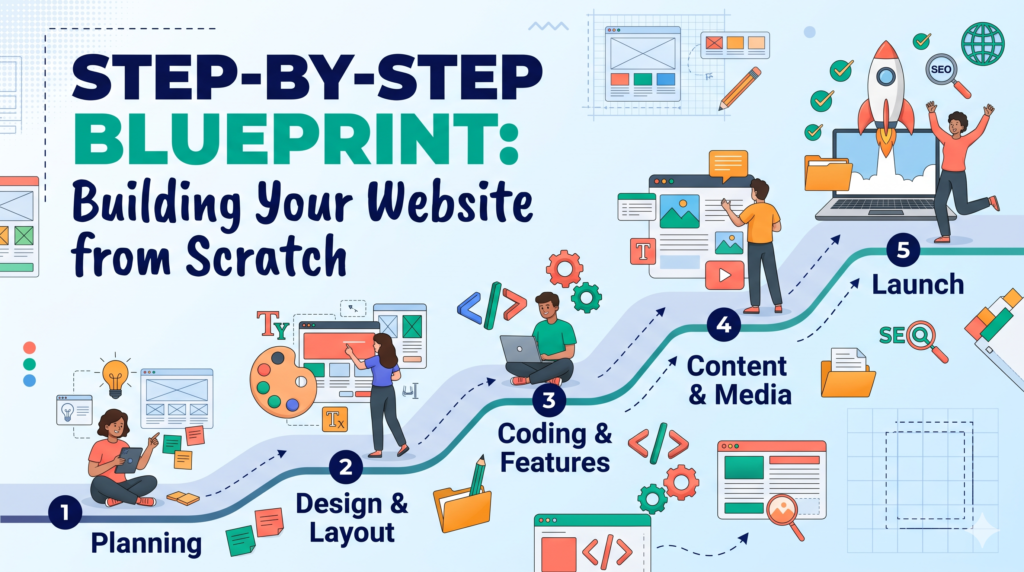
Choosing among the best website creators is only step one. Follow this proven five-phase workflow to take your website from a blank screen to a high-performing digital asset.
Phase 1: Define Your Core Objective and Audience
Every page on your site needs a single primary job. Are you trying to generate inbound discovery calls, sell physical products directly, build an email newsletter list, or showcase case studies to land freelance clients? Map out your target visitor’s biggest pain points and design your navigation around answering their questions in the fewest clicks possible.
Phase 2: Structure Your Information Architecture
Before touching fonts or colors, sketch out your sitemap. A clean, intuitive structure helps both human visitors and search engine crawlers navigate your content:
- Homepage: Clear value proposition above the fold, social proof (testimonials/logos), core offerings overview, and a primary call to action (CTA).
- About Page: Your story, mission, credentials, and why visitors should trust you over competitors.
- Services / Products Pages: Dedicated pages for each core offering rather than lumping everything onto one generic page (this dramatically improves SEO targeting).
- Blog / Resource Hub: Educational content designed to capture organic search traffic and demonstrate topical authority.
- Contact Page: Frictionless contact form, direct email, business hours, and location details if applicable.
Phase 3: Craft Conversion-Focused Copy and Visuals
Design supports copy—never the other way around. Write clear, benefit-driven headlines that explain what you do and who you help within three seconds of a visitor landing on the page. Pair your copy with authentic, high-resolution photography rather than generic stock clichés. Website creatorsCompress all images before uploading to keep page load times under two seconds.
Phase 4: Optimize On-Page SEO and Mobile Responsiveness
Over 60% of global web traffic originates on mobile devices, and Google uses mobile-first indexing exclusively. website creators Preview every single page on mobile and tablet viewports to ensure buttons are easy to tap, text is legible without zooming, and pop-ups do not obstruct content. Website Creators Complete your on-page SEO checklist by setting unique meta titles, meta descriptions, descriptive image alt text, and internal links connecting related pages.
Phase 5: Test, Launch, and Measure Performance
Before hitting publish, run a comprehensive pre-launch audit:
- Click every navigation link, button, and footer item to eliminate broken links.
- Submit test entries through every contact and checkout form.
- Connect Google Search Console and your analytics platform so you can monitor impressions, click-through rates, and user behavior from day one.
Common Mistakes to Avoid When Using Website Creators
Even with intuitive modern tools, first-time site builders frequently fall into avoidable traps that hurt credibility and search visibility:
- Overloading Pages with Animations and Heavy Media: Just because a platform lets you add parallax scrolling, auto-playing background videos, and custom cursors does not mean you should. Excessive scripts bloat page size, degrade Core Web Vitals, and frustrate mobile visitors.
- Neglecting Legal and Accessibility Basics: Depending on your region and audience, your website needs a clear Privacy Policy, Terms of Service, and cookie consent banner. Additionally, follow basic WCAG accessibility standards—maintain high color contrast between text and backgrounds, use proper heading hierarchies (H1 through H3), and provide alt text for screen readers.
- Treating Launch as the Finish Line: The most successful websites are living assets. Schedule monthly check-ins to update outdated information, publish fresh content, monitor search performance, and refine your highest-traffic landing pages based on real user data.
Frequently Asked Questions About Website Creators
Can I switch website creators later if my needs change?
Yes, though the ease of migration depends on the platforms involved. Website Creators Blog posts and product catalogs can usually be exported via CSV or XML files and imported into a new system. However,Website creators visual page layouts and custom styling cannot be transferred directly between proprietary platforms—you will need to rebuild your design on the new platform and set up 301 redirects for any changed URLs.
Do I need to buy a domain name separately?
Most website creators include a free custom domain for your first year when you purchase an annual plan, making setup effortless. However,Website creators many experienced site owners prefer registering their domain through an independent registrar (like Cloudflare, Namecheap, or Porkbun) so their domain management stays separate from their website hosting.
Are free website builder plans good enough for a business?
Free plans are great for testing an interface or hosting a personal hobby project, but they are rarely suitable for a serious business. Website Creators Free tiers typically force platform branding/ads onto your pages and restrict you to a branded subdomain (e.g., yourbusiness.platformsite.com), which undermines brand credibility and limits SEO potential.
Final Thoughts
Modern website creators have removed the technical barriers between having an idea and sharing it with the world. Whether you prioritize the design sophistication of Squarespace, the retail muscle of Shopify, the granular precision of Webflow, or the all-around versatility of Wix, the best platform is ultimately the one that lets you publish consistently without getting bogged down in technical maintenance. Website Creators Start with clear goals, focus on delivering genuine value to your visitors, and build a digital foundation designed to scale alongside your ambitions.